Sumi
一个现代、本地优先的 MkDocs 文档主题。写 Markdown,出好文档。
2026年11月2日
Sumi 文档#
Sumi 是 MkDocs 的文档主题。它把一个装满纯 Markdown 的文件夹变成完整、可搜索、可打印的网站,包括首页、博客和发布记录,而且不需要 Node.js、CDN 或任何托管服务。
- 安装 两行配置,把 Sumi 加到现有的 MkDocs 项目中。
- 写作 十六个组件,全部用原生 Markdown 书写。
- 页面类型 首页、博客、发布下载页和打印版(英文)。
- 自定义 颜色、导航、搜索、语言、版本和模板覆盖(英文)。
包含什么#
| 方面 | 内置功能 |
|---|---|
| 阅读 | 顶部标签、可折叠侧边栏、面包屑、随滚动高亮的目录、上一页 / 下一页 |
| 查找 | 支持中日韩文字的本地全文搜索,与命令面板合二为一(⌘ K) |
| 写作 | 提示框、标签页、步骤、卡片、字段表、图注、图集、徽章、文件树、Mermaid、ECharts、思维导图、KaTeX、按键、1 900 多个图标 |
| 页面 | 数据驱动的首页、带标签和 Atom 订阅的博客、带校验和的发布页、整站打印版 |
| 输出 | HTML、打印版、每页一份 Markdown 副本、llms.txt、Atom |
| 运维 | 深色模式、mike 多版本、语言切换、编辑链接、Git“最后更新”日期、统计分析 |
原则#
Sumi 遵循四条规则,详见设计原则。
- 内容始终是 Markdown。 组件就是引用块、列表、表格或代码块,加一行属性。
- 一切都在本地。 每个字体、图标和脚本都是你构建出的站点的一部分。
- 用到什么才加载什么。 图表和公式只在包含它们的页面上加载运行时。
- 人和智能体都是读者。 每个页面都同时以 HTML 和 Markdown 发布。
安装#
Sumi 是一个 Python 包。它依赖 MkDocs NG,所以安装 Sumi 时会一并安装 MkDocs。
环境要求#
- Python 3.10 或更高版本
- 一个 MkDocs 项目,或者一个空文件夹
安装软件包#
pip install mkdocs-sumi
uv add --dev mkdocs-sumi
pipx install mkdocs-ng --include-deps
pipx inject mkdocs-ng mkdocs-sumi
提示
在国内网络环境下,可以加上镜像源,例如 pip install -i https://pypi.tuna.tsinghua.edu.cn/simple mkdocs-sumi。Sumi 安装后不再访问任何外部网络。
启用主题和插件#
Sumi 分为两部分:主题负责绘制页面,插件负责 Markdown 组件、博客和额外的输出。两者都要启用:
theme:
  name: sumi
  locale: zh  # 中文界面;默认是 en

plugins:
  - search    # 提供 ⌘K 搜索
  - llms_txt  # 可选:生成 llms.txt 和每页的 Markdown 副本
  - sumi
重要
一旦写了 plugins: 列表,MkDocs 就不会再自动启用 search。请像上面那样显式列出。
预览#
mkdocs serve
打开 http://127.0.0.1:8000/,按 ⌘ K(或 Ctrl K)即可搜索。
下一步#
第一个站点#
本页从零搭建一个小站点:一个首页、两个指南页面和一篇博客文章。
提示
想更快?sumi-starter 是一个现成的模板仓库,包含中英文两套内容和 GitHub Pages 部署流程,点 Use this template 即可开始。
-
创建项目
mkdocs new my-docs cd my-docs -
规划文件
my-docs/
docs/
- index.md首页
guide/
- index.md分区首页,侧边栏标题链接到这里
- install.md
blog/
posts/
- hello.mdblog/ 下的页面都是博客文章
- mkdocs.yml站点配置
-
配置站点
mkdocs.ymlsite_name: 我的文档 site_url: https://example.com/ repo_url: https://github.com/me/my-docs theme: name: sumi locale: zh plugins: - search - sumi -
预览并构建
mkdocs serve        # 实时预览
mkdocs build        # 把静态文件写入 site/
导航如何生成#
顶层分区会成为页眉中的标签,当前标签内的页面显示在侧边栏中。如果一个分区的第一页是 index.md,它就是该分区的首页,点击分区标题会打开它。
提示
不写 nav: 时,MkDocs 会按文件夹结构生成导航。博客文章会自动从侧边栏中排除。
部署#
mkdocs build 会把纯 HTML、CSS 和 JavaScript 写入 site/。把这个文件夹上传到任意静态托管服务即可:GitHub Pages、Cloudflare Pages、Netlify、对象存储或 Nginx 服务器都行。部署后不需要运行任何程序。
mkdocs gh-deploy # 构建并推送到 gh-pages 分支
从 Material 迁移#
Sumi 能读取为 Material for MkDocs 编写的内容和大部分配置。切换通常只需改两行。
 theme:
-  name: material
+  name: sumi
 plugins:
   - search
+  - sumi
继续可用的部分#
| 你在用的 | 在 Sumi 中 |
|---|---|
admonition、!!! note 和 ??? note |
渲染为提示框,颜色与 > [!NOTE] 一致 |
pymdownx.details、pymdownx.tabbed(alternate 样式) |
原生样式 |
pymdownx.superfences、pymdownx.highlight |
支持;此时 Sumi 把代码高亮交给它们 |
pymdownx.arithmatex |
用内置的 KaTeX 渲染 |
pymdownx.keys |
保留;Sumi 自带的 ++Ctrl+K++ 让位 |
extra.social、extra.alternate、extra.analytics |
原样读取,包括 fontawesome/brands/… 图标名 |
mkdocstrings API 页面 |
有样式:签名、符号徽章(show_symbol_type_heading)、标签、嵌套成员、反向链接和源码面板。推荐配置(英文) |
使用 Material --md-* 颜色或 [data-md-color-scheme] 的插件 CSS |
跟随 Sumi 的配色和深色模式。插件作者请看:让插件适配 Sumi(英文) |
mike 多版本 |
theme.version_provider: mike |
博客:blog/posts/、.authors.yml、date、authors、tags、<!-- more --> |
原样读取 |
front matter 中的 hide: [toc, navigation] |
改为 hide: [toc, sidebar] |
需要调整的部分#
- Material 的
theme.features和theme.palette列表会被忽略,请改用主题选项(英文)。 - 写成
:material-…:或:octicons-…:的图标仍需pymdownx.emoji扩展。Sumi 自带的行内图标是:lucide-name:和:brand-name:。 - 不模拟 Material Insiders 的功能。
注意
如果切换后某个页面显示不对,请提交 issue,附上导致问题的 Markdown。
用 Sumi 写作#
Sumi 为 Markdown 增加了十六个组件。它们都没有引入会在 GitHub 上失效的新语法:每个组件都是引用块、列表、表格、图片或代码块,有时下面再跟一行花括号里的属性。
1. 安装主题
2. 启用插件
{.steps}
不认识 Sumi 的渲染器看到的是一个编号列表;Sumi 看到的是一组操作步骤。
组件#
各组件的详细说明目前只有英文版,下表链接到英文页面。
| 组件 | 写法 | 说明页 |
|---|---|---|
| 提示框 | > [!NOTE]、> [!TIP]- |
Callouts |
| 带标题的代码块 | ```py title="app.py" |
Code blocks |
| 标签页 | ```sh {tab="Linux"} |
Tabs |
| 步骤 | 有序列表 + {.steps} |
Steps |
| 卡片 | 链接组成的无序列表 + {.cards} |
Cards |
| 字段表 | 表格 + {.fields} |
Fields |
| 表格选项 | 表格 + {.wide}、{caption="…"} |
Tables |
| 图片与图注 | 图片 + {caption="…"} |
Images |
| 图集 | 图片列表 + {.gallery} |
Galleries |
| 文件树 | ```filetree |
File trees |
| 图表(Mermaid) | ```mermaid |
Diagrams |
| 数据图表 | ```echarts(YAML 或 JSON) |
Charts |
| 思维导图 | ```markmap |
Mind maps |
| 数学公式 | $…$、$$…$$ |
Math |
| 按键与图标 | ++Ctrl+K++、:lucide-rocket: |
Keys and icons |
| 徽章 | **新**{.badge} |
Badges |
属性行#
属性行是一个只包含 {…} 的段落,紧跟在它所修饰的块下方。它可以带类名、id 和键值对:
| 名称 | 类型 |
| --- | --- |
| `port` | integer |
{.fields #server-options caption="服务器选项"}
Sumi 不认识的类名会原样保留,你可以在 extra_css 中自己给这些块加样式。
一个例子#
下面三个组件就是用上面的写法渲染出来的。
提示
提示框是一个以 [!TIP] 开头的引用块。在 GitHub 上它同样显示为提示。
- 写一个有序列表
- 在下面加一行
{.steps} - 它就变成了步骤
localestringen、zh、zh_TWpalettestringauto、light 或 darkMarkdown 扩展#
sumi 插件会替你启用以下 Python-Markdown 扩展,无需额外配置:
attr_list、md_in_html、tables、toc(带永久链接)、footnotes、def_list、admonitionfenced_code和codehilite。如果配置了pymdownx.superfences和pymdownx.highlight,Sumi 会把代码交给它们处理
markdown_extensions 中的其他扩展照常工作。
提示
本站每个页面都是用这些组件写的。点击页面顶部的 复制为 Markdown 即可查看源码。
Callouts#
A callout draws attention to information that should not be missed. Sumi uses the syntax GitHub introduced for alerts, so callouts render on GitHub, in your editor's preview and in Sumi alike.
> [!NOTE]
> Sumi reads the same syntax GitHub does.
注意
Sumi reads the same syntax GitHub does.
The five types#
注意
Useful information that users should know, even when skimming.
提示
Helpful advice for doing things better or more easily.
重要
Key information users need to achieve their goal.
警告
Urgent information that needs immediate attention to avoid problems.
小心
Advises about risks or negative outcomes of certain actions.
> [!NOTE]
> [!TIP]
> [!IMPORTANT]
> [!WARNING]
> [!CAUTION]
Sumi also accepts the type names used by Material for MkDocs — info, success, question, failure, danger, bug, example, quote, abstract and todo — each mapped to the closest colour.
Custom titles#
Text after the marker replaces the default title:
> [!WARNING] Back up first
> `mkdocs gh-deploy --force` replaces the whole `gh-pages` branch.
Back up first
mkdocs gh-deploy --force replaces the whole gh-pages branch.
Collapsible callouts#
Add - after the marker for a callout that starts closed, or + for one that starts open but can be closed.
> [!TIP]- Why is it called Sumi?
> *Sumi* (墨) is the ink of East Asian calligraphy: one colour, many shades.
Why is it called Sumi?
Sumi (墨) is the ink of East Asian calligraphy: one colour, many shades.
Collapsed callouts are printed open.
Rich content#
A callout can hold anything a blockquote can — lists, code, tables, even other callouts.
Before you upgrade
1. Read the release notes.
2. Pin the version in requirements.txt:
```text
mkdocs-sumi==0.1.0
```
Admonitions#
If your pages already use the admonition extension, they keep working and look the same:
!!! warning "Deprecated"
    Use `theme.palette` instead.
Deprecated
Use theme.palette instead.
??? note and ???+ note from pymdownx.details are styled as collapsible callouts.
Code blocks#
Fenced code blocks are highlighted at build time by Pygments. Every block gets a copy button; no JavaScript highlighter is shipped.
def greet(name: str) -> str:
    return f"Hello, {name}!"
File names#
Add title="…" after the language to show a file name above the code:
```toml title="pyproject.toml"
[project]
name = "my-docs"
dependencies = ["mkdocs-sumi"]
```
[project]
name = "my-docs"
dependencies = ["mkdocs-sumi"]
Line numbers and highlighted lines#
These options come from Python-Markdown's codehilite, or from pymdownx.highlight if you use it:
```python hl_lines="2 3"
def total(items):
    subtotal = sum(i.price for i in items)
    return subtotal * 1.2
```
def total(items):
    subtotal = sum(i.price for i in items)
    return subtotal * 1.2
To show line numbers on every block, configure the extension:
markdown_extensions:
  - codehilite:
      linenums: true
Shell sessions#
Use console for transcripts with prompts and output. The copy button then copies only the commands — without the $ prompts and without the output.
$ mkdocs build
INFO    -  Building documentation to directory: site
INFO    -  Documentation built in 0.42 seconds
Diffs#
 theme:
-  name: mkdocs
+  name: sumi
Inline code#
Write inline code with single backticks: mkdocs serve. In prose, Sumi gives inline code a quiet background that works in light and dark mode.
提示
To show tabs with one variant per operating system or language, see Tabs.
Tabs#
Consecutive code fences that each carry {tab="…"} become one tab set. Without Sumi, they are simply consecutive code blocks with a hint of what each one is for.
```sh {tab="macOS"}
brew install python
```

```sh {tab="Ubuntu"}
sudo apt install python3
```

```powershell {tab="Windows"}
winget install Python.Python.3.12
```
brew install python
sudo apt install python3
winget install Python.Python.3.12
Synchronised tabs#
Tab sets with the same labels stay in sync: choose Windows once and every matching tab set on every page follows. The choice is remembered in the browser.
python3 -m venv .venv && source .venv/bin/activate
python3 -m venv .venv && source .venv/bin/activate
py -m venv .venv; .venv\Scripts\Activate.ps1
Titles inside tabs#
title and tab combine:
```yaml {tab="YAML" title="mkdocs.yml"}
theme: sumi
```

```toml {tab="TOML" title="pyproject.toml"}
[tool.mkdocs]
theme = "sumi"
```
theme:
  name: sumi
[tool.mkdocs]
theme = "sumi"
Tabs with prose#
For tabs that contain more than code, use pymdownx.tabbed with alternate_style: true. Sumi styles it to match:
markdown_extensions:
  - pymdownx.superfences
  - pymdownx.tabbed:
      alternate_style: true
In print and in the Markdown copy, every tab is shown one after another under its label.
Steps#
Put {.steps} under an ordered list to draw it as a procedure: numbered markers joined by a line, with each step's first line as its heading.
1. Create a virtual environment

    ```sh
    python -m venv .venv
    ```

2. Install Sumi

    ```sh
    pip install mkdocs-sumi
    ```

3. Start the preview server

    Run `mkdocs serve` and open the address it prints.
{.steps}
-
Create a virtual environment
python -m venv .venv -
Install Sumi
pip install mkdocs-sumi -
Start the preview server
Run
mkdocs serveand open the address it prints.
Short steps#
Steps do not need bodies:
- Write
- Preview
- Publish
Guidelines#
- Start each step with a verb.
- Keep one action per step. If a step needs a list of its own, it is probably two steps.
- Indent step content by four spaces so it stays inside the step.
Cards#
A bullet list of links followed by {.cards} becomes a grid. The link is the card title; the text after it is the description; an inline icon at the start becomes the card icon.
- :lucide-rocket: [Install](../start/install.md)
  Add Sumi to a project.
- :lucide-pen-line: [Write](index.md)
  Components in plain Markdown.
- :lucide-palette: [Customize](../customize/theme.md)
  Colours, fonts and layout.
{.cards}
- Install Add Sumi to a project.
- Write Components in plain Markdown.
- Customize Colours, fonts and layout.
Columns#
Cards fill as many columns as fit, up to three. Set cols to fix the number:
{.cards cols=2}
- Source code Report a bug or send a pull request.
- PyPI Release history and downloads.
Cards without links#
Items without a link render as static cards — useful for a list of features:
- Local-first Every asset ships with your site.
- Fast No framework; one small script.
- Printable A whole-site print edition.
Fields#
Configuration options and API parameters are usually written as a table, and tables become hard to read once descriptions grow. Add {.fields} and Sumi turns each row into a reference entry: the name and its type, default and required flag on one line, the description underneath.
| Name | Type | Default | Required | Description |
| --- | --- | --- | --- | --- |
| `site_name` | string | | yes | The title of the site, used in the header and in every page title. |
| `site_url` | string | `null` | | The canonical address of the built site. Required for the sitemap, the feed and `llms.txt`. |
| `strict` | boolean | `false` | | Stop the build on any warning, such as a broken link. |
{.fields}
site_namestringrequiredsite_urlstringDefault nullllms.txt.strictbooleanDefault falseWhich columns are metadata#
The first column is always the name. Columns headed Type, Default and Required (or 类型, 默认值, 必填) become chips next to it. Every other column becomes part of the description.
To choose the metadata columns yourself, list their headings in meta:
{.fields meta="type since"}
idintegerSince 1.0assetslistSince 1.2Linking to a field#
Each entry keeps the content of its name cell, so you can add an anchor with attr_list:
| `strict`{#strict} | boolean | `false` | Stop on warnings. |
The Markdown copy of the page keeps the original table.
Tables#
Tables are standard GitHub-flavoured Markdown. Sumi gives them a frame, sticky headers and horizontal scrolling on narrow screens.
| Command | Purpose |
|---|---|
mkdocs new |
Create a new project |
mkdocs serve |
Start a live-reloading preview |
mkdocs build |
Build the site |
mkdocs gh-deploy |
Build and deploy to GitHub Pages |
Captions#
| Plan | Price |
| --- | --- |
| Open source | Free |
{caption="Sumi is licensed under Apache 2.0."}
| Plan | Price |
|---|---|
| Open source | Free |
Variants#
Add one or more of these classes on the attribute line:
| Class | Effect |
|---|---|
.wide |
Let the table use the full width of the content area |
.compact |
Reduce cell padding for dense data |
.striped |
Shade alternate rows |
.center |
Centre all cells |
{.compact .striped caption="Variants"}
Alignment#
Column alignment uses the standard colon syntax:
| Left | Centre | Right |
| :--- | :---: | ---: |
| a | b | 1.00 |
| Left | Centre | Right |
|---|---|---|
| a | b | 1.00 |
| longer text | c | 120.50 |
提示
For option and parameter references, use fields instead of a wide table.
Images#
Images use standard Markdown. Paths are relative to the page, so the image works in your editor, on GitHub and on the site.

Figures#
Add {caption="…"} on the line after an image to turn it into a figure:

{caption="The Sumi mark: an ink stroke and a vermilion seal."}

Zoom#
Click an image in the content to view it full-screen; press Esc or click again to close. Images inside links and cards are not zoomable. To opt an image out, give it the no-zoom class:
{.no-zoom}
Light and dark variants#
Append #only-light or #only-dark to an image URL to show it in one colour scheme only:


Size and placement#
With attr_list, set the width or float an image:
{width="120"}
{.left width="320"}
注意
Images are lazy-loaded. Give large images explicit width and height attributes to avoid layout shift.
Galleries#
A bullet list of images followed by {.gallery} becomes an image grid. Text after an image is its caption. Click an image to see it full size.
- 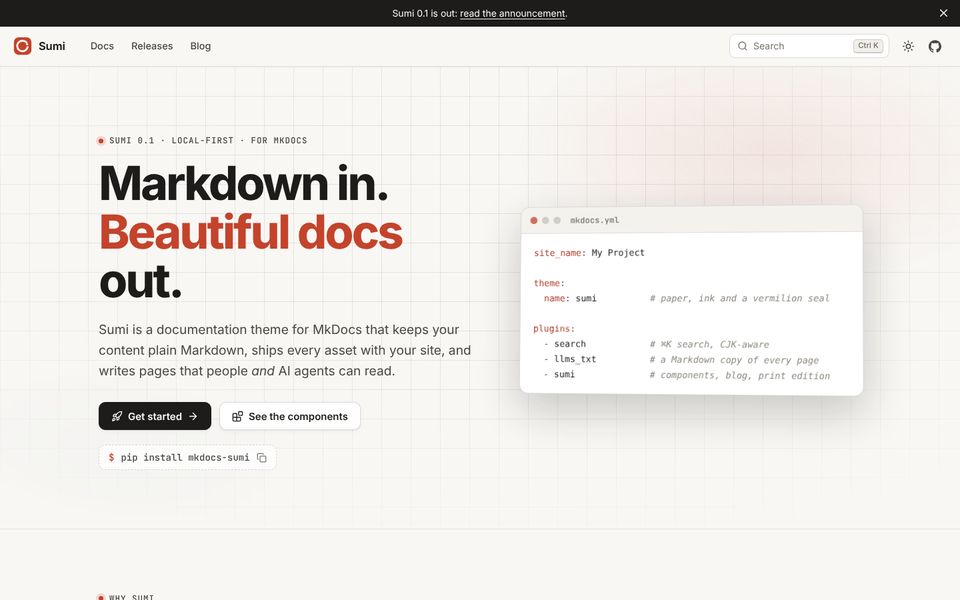
Home page
- 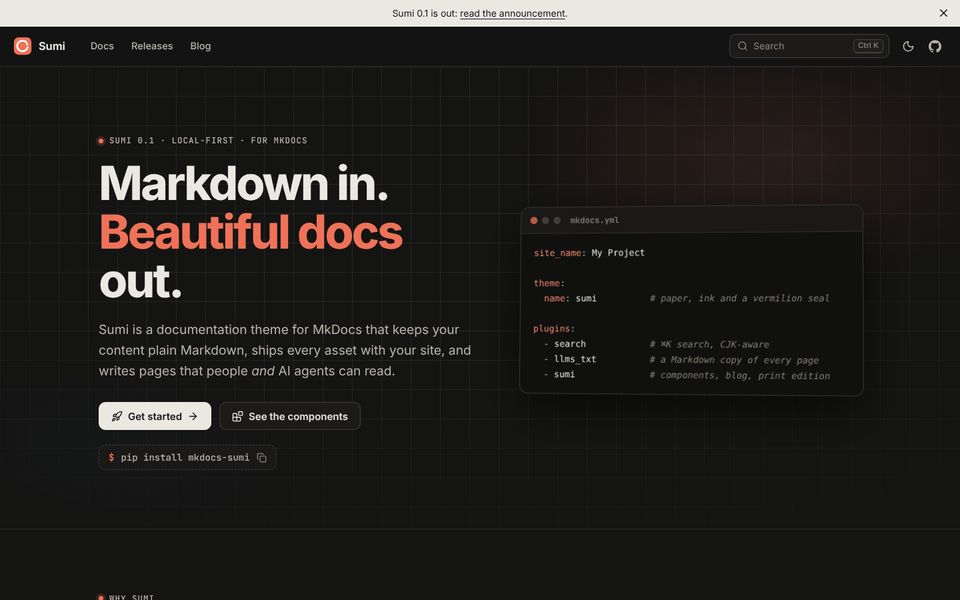
Dark mode
- 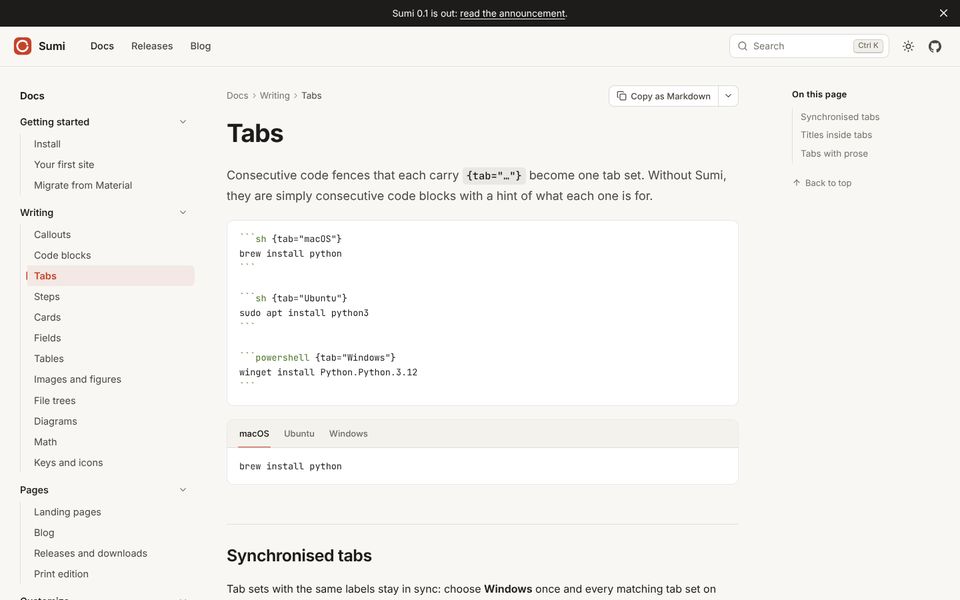
Documentation
- 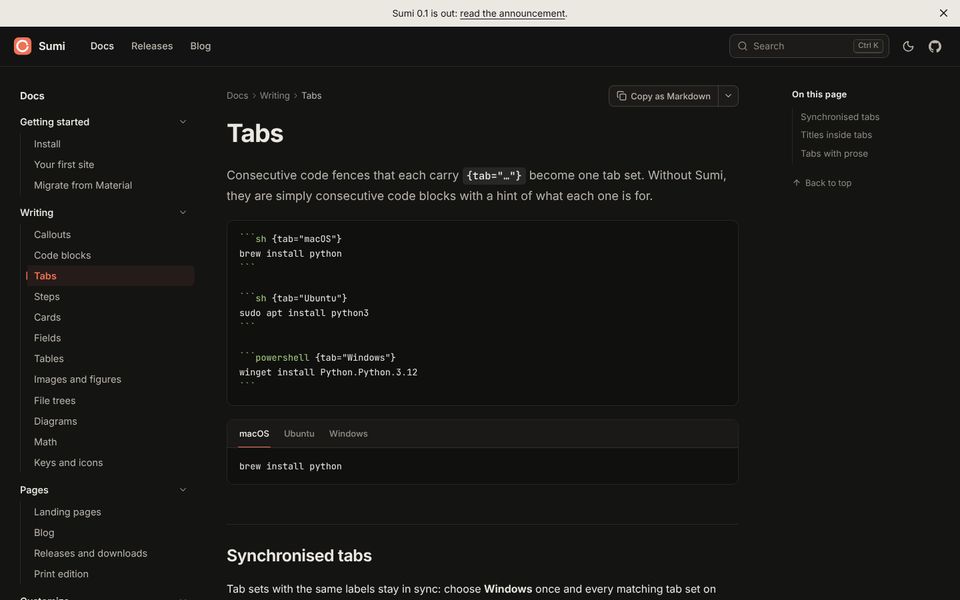
Documentation, dark
- 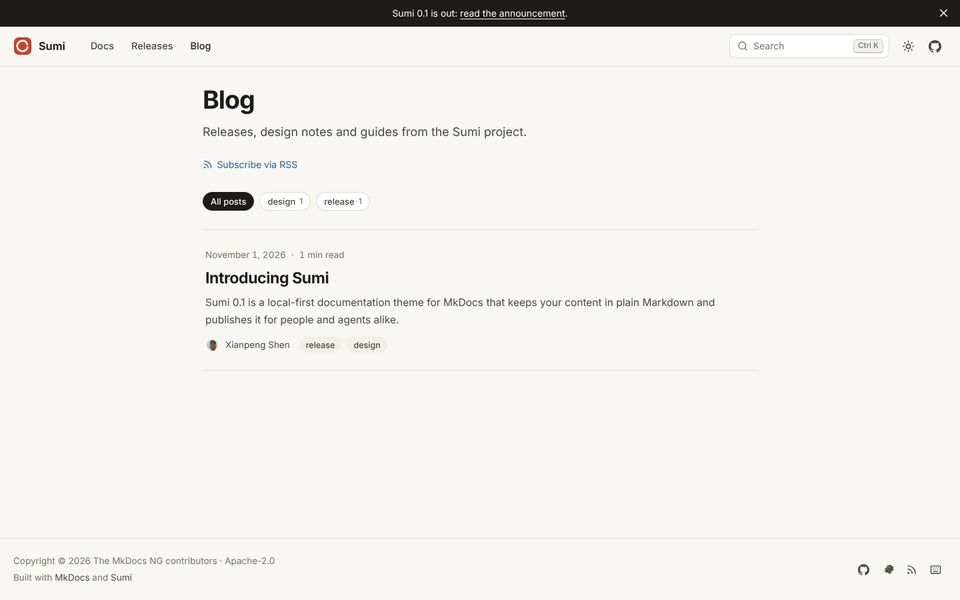
Blog
- 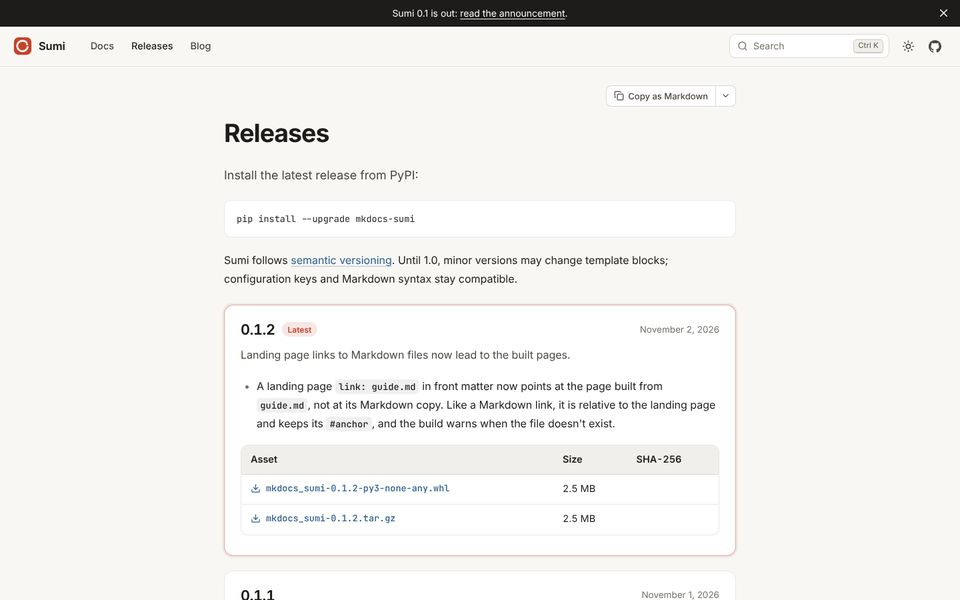
Releases and downloads
{.gallery}
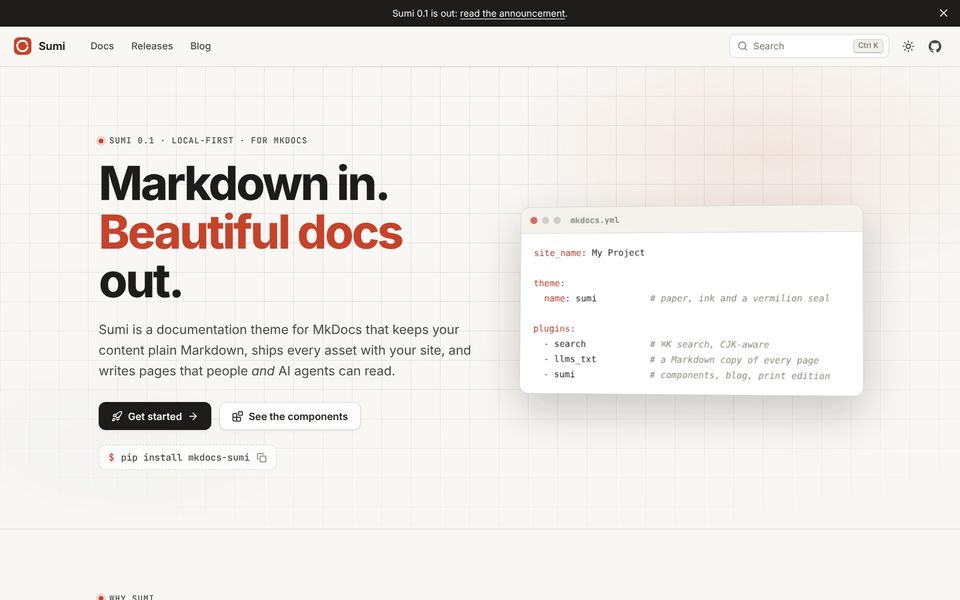 Home page
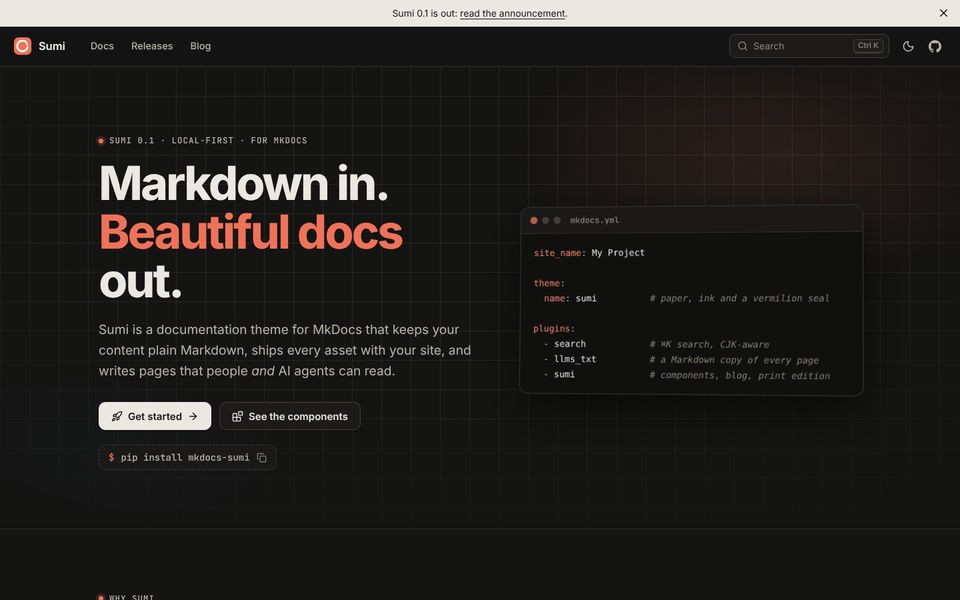 Dark mode
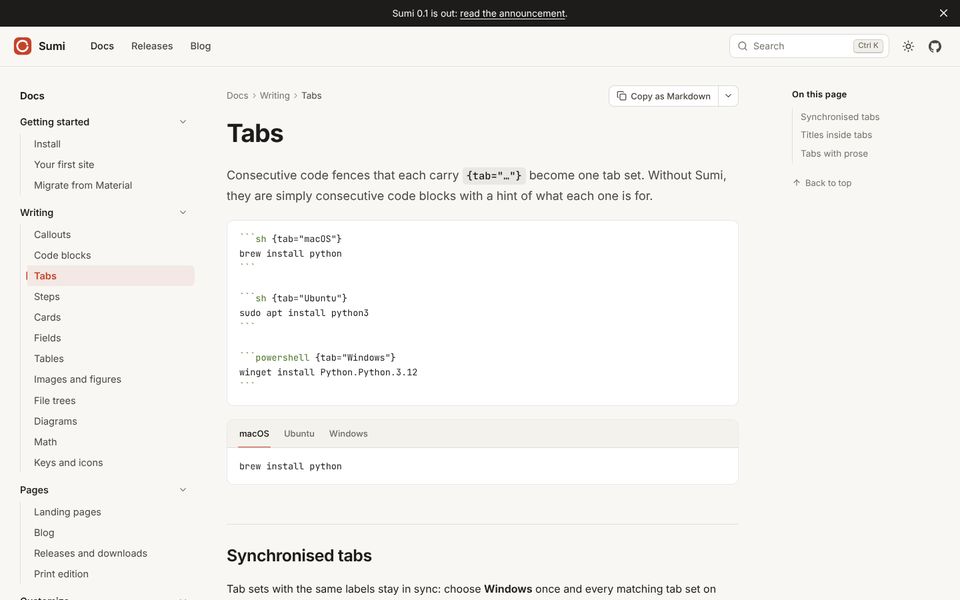 Documentation
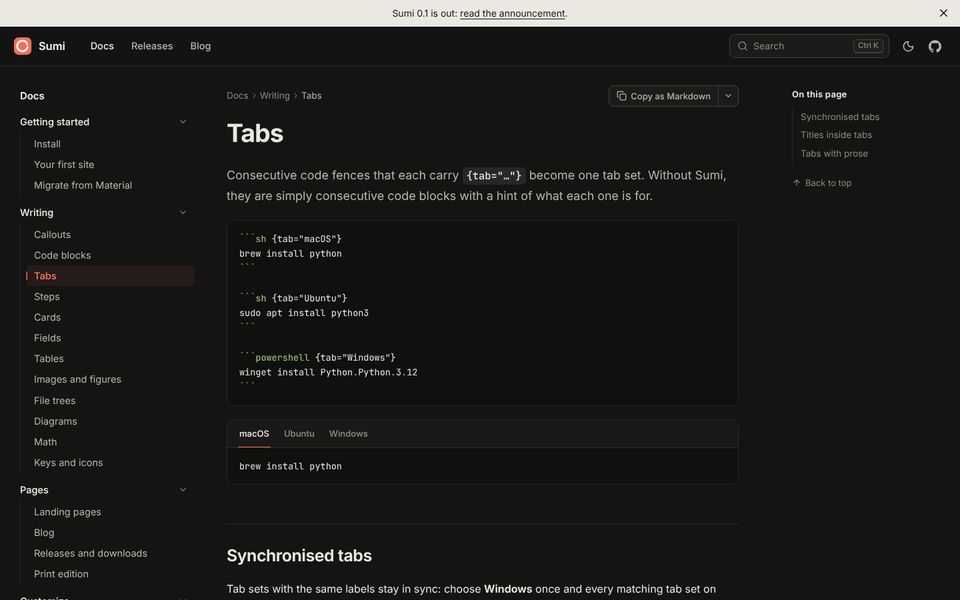 Documentation, dark
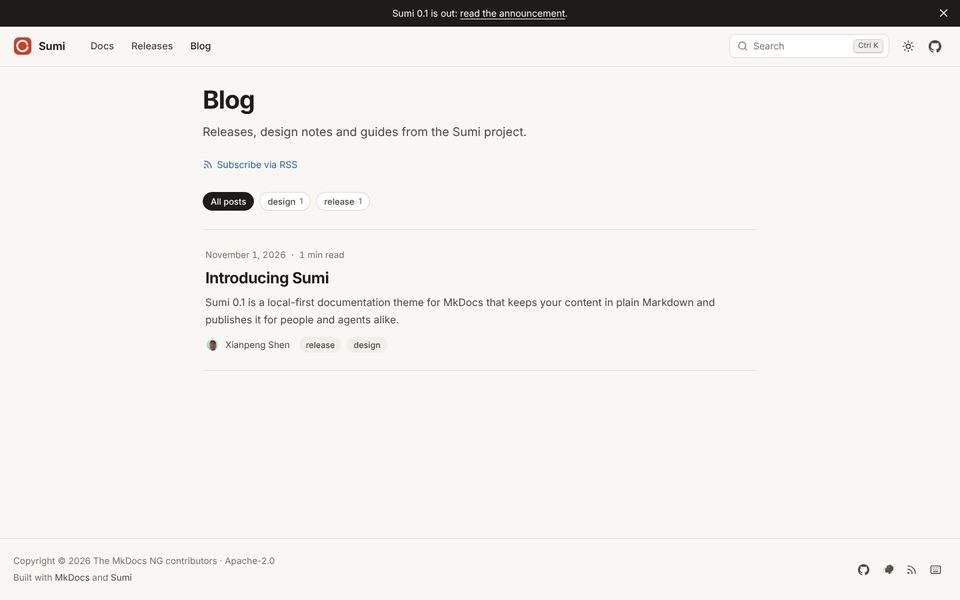 Blog
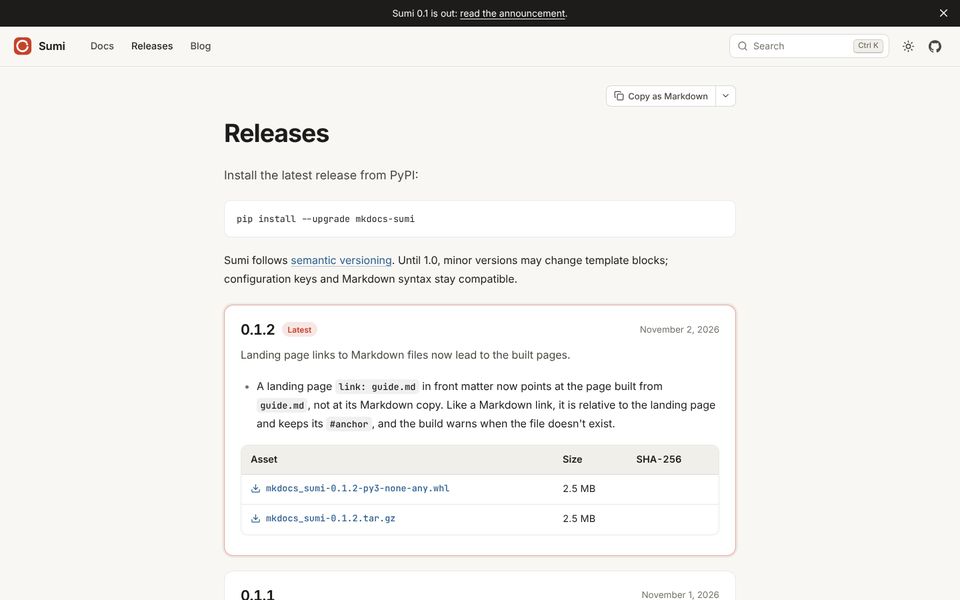 Releases and downloads
On GitHub and in the Markdown copy of the page, this is still a list of images with captions.
Columns and shape#
The grid fits as many columns as there is room for, up to three. Set cols to change that. Images are cropped to 4:3; set --ratio in style for another shape:
- 
- 
{.gallery cols="2" style="--ratio: 16 / 10"}
-
Light
-
Dark
Links#
Wrap an image in a link to open a page instead of the full-size image:
- [](../pages/blog.md)
Blog layout
{.gallery}
File trees#
A filetree fence turns a directory listing into a navigable tree with folder and file icons. Paste the output of tree, or write the structure with plain indentation.
```filetree
my-docs/
├── docs/                 # Markdown sources
│   ├── index.md
│   ├── guide/
│   │   ├── install.md
│   │   └── usage.md
│   └── assets/
│       └── logo.svg
├── overrides/            # Template overrides (optional)
│   └── main.html
├── pyproject.toml
└── mkdocs.yml            # Site configuration
```
my-docs/
docs/Markdown sources
- index.md
guide/
- install.md
- usage.md
assets/
- logo.svg
overrides/Template overrides (optional)
- main.html
- pyproject.toml
- mkdocs.ymlSite configuration
Rules#
- A name ending in
/, or a name with children, is a folder. Click a folder to fold it. - Text after
#is a comment and is aligned in a column. - File icons follow the extension: code, text, configuration, data, images and archives.
- Indentation by spaces works as well as box-drawing characters.
Plain indentation#
```filetree title="Package layout"
src/
  mkdocs_sumi/
    plugin.py      # The MkDocs plugin
    theme/         # Jinja templates and assets
tests/
```
src/
mkdocs_sumi/
- plugin.pyThe MkDocs plugin
- theme/Jinja templates and assets
- tests/
The tree is built at build time from plain HTML <details> elements, so it needs no JavaScript and prints fully expanded.
Diagrams#
A mermaid fence is drawn as a diagram by Mermaid. Sumi bundles Mermaid with the theme and loads it only when a diagram is about to scroll into view. Mermaid is split by diagram type, so a page with one flowchart downloads the flowchart code and nothing else. Other pages do not pay for it at all.
```mermaid
flowchart LR
  md[Markdown] --> mk{MkDocs}
  mk --> html[HTML pages]
  mk --> txt[llms.txt]
  mk --> copy[Markdown copies]
```
flowchart LR
  md[Markdown] --> mk{MkDocs}
  mk --> html[HTML pages]
  mk --> txt[llms.txt]
  mk --> copy[Markdown copies]
Diagrams follow the colour scheme: switch to dark mode and they are redrawn.
Hover a diagram (or tap it on a phone) for three buttons: open it full screen, copy its Mermaid source, and download it as an SVG file. Until a diagram is drawn, and in a browser without JavaScript, readers see its source text.
Sequence diagrams#
sequenceDiagram
  participant B as Browser
  participant S as Static host
  B->>S: GET /guide/
  S-->>B: index.html
  B->>S: GET /search/search_index.json (on ⌘K)
  S-->>B: JSON index
  Note over B: Search runs locally
Captions#
A title on the fence becomes the caption:
```mermaid title="Build pipeline"
flowchart LR
  a --> b
```
stateDiagram-v2
  direction LR
  [*] --> Config
  Config --> Files
  Files --> Nav
  Nav --> Pages
  Pages --> [*]
注意
Mermaid is loaded as a JavaScript module, which browsers do not allow from file:// pages. Open the built site through a web server (mkdocs serve, python -m http.server) or any static host.
注意
If you use pymdownx.superfences with a custom fence for Mermaid, remove it: Sumi handles mermaid fences itself. To turn Sumi's handling off, set mermaid: false on the plugin.
Charts and mind maps#
Two more fences draw pictures from text. Like diagrams, their scripts ship with Sumi and load only when a chart or mind map is about to scroll into view.
Charts#
An echarts fence holds an Apache ECharts option, written in YAML or JSON. Sumi checks it when the site is built: a fence that is not valid YAML or JSON is left as a code block and the build prints a warning.
```echarts title="Build time for 1 000 pages (seconds)"
xAxis:
  type: category
  data: [MkDocs 1.6, MkDocs NG, NG + Sumi]
yAxis:
  type: value
series:
  - type: bar
    data: [18.1, 8.4, 12.0]
```
xAxis:
  type: category
  data: [MkDocs 1.6, MkDocs NG, NG + Sumi]
yAxis:
  type: value
series:
  - type: bar
data: [18.1, 8.4, 12.0]Charts use the site's accent colour first, follow the colour scheme, and redraw when the page is resized. Set height on the fence to change the height in pixels (the default is 360):
```echarts height="240"
series:
  - type: pie
    radius: ["45%", "70%"]
    data:
      - {name: Markdown, value: 60}
      - {name: Templates, value: 15}
      - {name: Search index, value: 16}
      - {name: Other, value: 9}
```
tooltip: {}
series:
  - type: pie
    radius: ["45%", "70%"]
    data:
      - {name: Markdown, value: 60}
      - {name: Templates, value: 15}
      - {name: Search index, value: 16}
      - {name: Other, value: 9}
Without JavaScript, and in the Markdown copy of the page, readers see the YAML source.
注意
Options are data, not code: functions such as custom formatter callbacks cannot be written in YAML or JSON. Use template strings like formatter: "{b}: {c}" instead.
Mind maps#
A markmap fence draws a mind map from headings and nested lists. Click a node to fold or unfold its branch; drag to pan and scroll to zoom.
```markmap height="360"
# Sumi
## Write
- Callouts
- Tabs and steps
- Diagrams and charts
## Publish
- Landing page
- Blog
- Releases
## Read
- ⌘K search
- Dark mode
- Print edition
```
Sumi
- Write
- Callouts
- Tabs and steps
- Diagrams and charts
- Publish
- Landing page
- Blog
- Releases
- Read
- ⌘K search
- Dark mode
- Print edition
The outline is turned into a tree when the site is built. Without JavaScript, in print and in the Markdown copy, readers see it as a nested list.
Turning them off#
If another plugin already handles echarts or markmap fences, switch Sumi's handling off:
plugins:
  - sumi:
      echarts: false
      markmap: false
Math#
Write TeX between dollar signs. Sumi typesets it with a bundled copy of KaTeX, loaded only on pages that contain a formula.
Inline formulas#
Euler's identity, $e^{i\pi} + 1 = 0$, links five constants.
Euler's identity, e^{i\pi} + 1 = 0, links five constants.
A dollar sign followed by a space, or preceded by a letter or digit, is not math — so prices such as $5 or $10 stay as written. Escape a literal dollar sign as \$.
Display formulas#
$$
\hat{f}(\xi) = \int_{-\infty}^{\infty} f(x)\, e^{-2\pi i x \xi}\, dx
$$
Multi-line environments work too:
Compatibility#
If pymdownx.arithmatex is configured with generic: true, Sumi renders its output with the same KaTeX and turns its own $ parsing off. To disable math entirely, set math: false on the plugin.
Keys and icons#
Keyboard shortcuts#
Wrap a key combination in double plus signs:
Press ++Ctrl+Shift+P++ to open the command palette, or ++Esc++ to close it.
Press Ctrl+Shift+P to open the command palette, or Esc to close it.
For a single key in running text, plain <kbd> also works: Enter.
Icons#
Write :lucide-name: to insert any of the 2 000 Lucide icons, or :brand-name: for a brand logo. Icons are inlined as SVG at build time and take the colour of the surrounding text.
:lucide-rocket: Launch · :lucide-shield-check: Secure · :lucide-languages: Translated
Launch · Secure · Translated
Unknown names are left as text, so a typo is easy to spot.
Brand icons#
| Icon | Name | Icon | Name |
|---|---|---|---|
brand-github |
brand-gitlab |
||
brand-gitee |
brand-codeberg |
||
brand-python |
brand-pypi |
||
brand-docker |
brand-rust |
||
brand-x |
brand-mastodon |
||
brand-bluesky |
brand-discord |
||
brand-wechat |
brand-zhihu |
||
brand-bilibili |
brand-xiaohongshu |
||
brand-youtube |
brand-rss |
The full set also includes bitbucket, telegram, reddit, stackoverflow, npm, go, postgresql, markdown, readthedocs, matrix, qq, medium, devdotto, substack, facebook and instagram.
In templates and front matter#
The same names are used everywhere Sumi accepts an icon: landing page features, buttons, social links and cards.
extra:
  social:
    - icon: brand-github
      link: https://github.com/mkdocs-ng/mkdocs-sumi
Badges#
Put {.badge} right after bold or italic text to turn it into a badge. This is the standard attr_list syntax, so a renderer that does not know Sumi still shows the word in bold.
## Command palette **New**{.badge .new}

| Option | Status |
| --- | --- |
| `palette` | **Stable**{.badge .tip} |
| `brand` | **Beta**{.badge .warning} |
| `legacy_nav` | **Deprecated**{.badge .deprecated} |
| Option | Status |
|---|---|
palette |
Stable |
brand |
Beta |
legacy_nav |
Deprecated |
Tones#
A second class picks the colour. Without one, a badge is neutral grey.
| Class | Badge |
|---|---|
| (none) | Default |
.note, .info |
Note |
.tip, .success |
Stable |
.important, .new |
New |
.warning |
Beta |
.caution, .danger, .deprecated |
Removed |
.accent |
Sumi |
In headings#
A badge in a heading shrinks to fit, and stays out of the table of contents text.
Version 0.2 Latest#
## Version 0.2 **Latest**{.badge .tip}
Landing pages#
A landing page is a Markdown file with template: landing.html. Its sections are described in front matter, so the page stays data you can review in a diff — no HTML, no components to import. The home page of this site is one.
---
template: landing.html
hero:
  eyebrow: "v2.0 is out"
  title: "Ship docs<br>*people read*."
  text: One sentence that explains the product.
  actions:
    - {text: Get started, link: guide/, icon: rocket, primary: true}
    - {text: GitHub, link: "https://github.com/me/project", icon: brand-github}
  install: pip install my-project
sections:
  - type: features
    title: Why it is different
    items:
      - {icon: zap, title: Fast, text: Builds in under a second., link: guide/speed/}
      - {icon: lock, title: Private, text: Runs entirely on your machine.}
  - type: cta
    title: Ready?
    actions:
      - {text: Read the guide, link: guide/, primary: true}
---
A link to a Markdown file, such as guide.md or guide/speed.md#cache, leads to the page built from it. Like a Markdown link, it is relative to the landing page, and the build warns when the file doesn't exist. Other links are relative to the site root, like nav entries. Text fields accept inline Markdown.
Hero#
eyebrowstringtitlestring<br> breaks lines; *emphasis* is drawn in the accent colour. Defaults to the page title.textstringsite_description.actionslisttext, link, icon, primary.installstringcodeobjecttitle, lang, content.imagestringcode.Sections#
Every entry in sections has a type and optional eyebrow, title, text, id and tone: soft (a tinted background).
featuresKeys items, columnsicon, title, text and an optional link.splitKeys bullets, actions, code or image or markdown, reversestatsKeys itemsvalue and label.stepsKeys itemstitle and text.faqKeys itemsq and a (Markdown).ctaKeys actionscontentsections is omitted, the body is shown under the hero.提示
Keep the page body for content that agents and search should see. The front-matter sections are visual; the Markdown copy of a landing page contains its title, text and body.
Blog#
Every Markdown file under docs/blog/ is a post. Sumi generates the blog index, keeps posts out of the sidebar, and writes an Atom feed. You don't need another plugin.
docs/
blog/
- .authors.ymloptional: author names and avatars
- index.mdoptional: the blog's title and intro
posts/
- 2026-11-01-introducing-sumi.md
- 2026-11-15-search.md
See it on this site's blog.
Writing a post#
---
date: 2026-11-01
authors: [xianpeng]
tags: [release, design]
description: Sumi 0.1 is out.
---

# Introducing Sumi

The first paragraph is the excerpt shown on the index.

<!-- more -->

The rest of the post.
datedateupdateddateauthorslist.authors.yml, or plain names.tagslistcategories is accepted too.descriptionstring<!-- more --> is used.imagestringdocs/. Shown at the top of the post, on its card in the card view, and as the preview when the post is shared. Set hide_cover: true to keep it off the post itself.draftbooleanAuthors#
authors:
  xianpeng:
    name: Xianpeng Shen
    description: Maintainer
    avatar: https://github.com/shenxianpeng.png
    url: https://github.com/shenxianpeng
The format is the same as the Material blog plugin's, so an existing file can be reused.
The index page#
Without docs/blog/index.md, Sumi creates one titled "Blog". To add an introduction, create the file; any Markdown in it is shown above the list of posts. Tag filters appear when posts have tags, and a filter can be linked to as blog/#tag=release.
List and card views#
The index shows posts as a list, or as a grid of cards with cover images. Readers can switch with the buttons next to the tag filters; their choice is remembered. Pick the default with blog.layout:
plugins:
  - sumi:
      blog:
        layout: cards    # or list (the default)
A post without an image gets a cover drawn from the accent colour and its first tag.
Feed#
An Atom feed is written to blog/feed.xml and linked from every page's <head>, so feed readers find it from any URL. It needs site_url to produce absolute links.
Options#
plugins:
  - sumi:
      blog:
        dir: blog        # folder under docs/ that contains posts
        feed: true
        feed_items: 20
        layout: list     # or cards
Releases#
A page with template: releases.html lists versions with their notes and downloadable assets. Each asset shows its size and a SHA-256 checksum that copies on click. See this site's releases.
---
template: releases.html
releases: releases.yml
---

# Releases

Download the latest version, or browse the history.
releases is either a list in the front matter or a path to a YAML file relative to docs/.
- version: 0.2.0
  date: 2026-12-01
  summary: Versioned docs and a Japanese interface.
  notes: |
    - **New:** `version_provider: mike`.
    - **Fixed:** tabs no longer jump when switching.
  assets:
    - name: mkdocs_sumi-0.2.0-py3-none-any.whl
      url: https://example.com/mkdocs_sumi-0.2.0-py3-none-any.whl
      size: 1.9 MB
      sha256: 9f2c0a…
- version: 0.1.0
  date: 2026-11-01
  notes: First release.
Fields#
versionstringreleases/#v0-2-0 links to it.titlestringdatedatestatusstringlatest, stable, prerelease or archived. The first release defaults to latest.summarystringnotesstringassetslistname, url, size, sha256.The page's own Markdown is shown above the list, so you can add installation instructions or a support policy.
Print edition#
Sumi writes the whole site as one long page at /print/, in navigation order, with a cover and a table of contents. Open it and print to PDF for an offline manual. Open this site's print edition.
Every page also prints cleanly on its own: the header, sidebars and buttons are hidden, collapsed callouts are expanded, tabs are shown one after another, and links show their address.
How it works#
The print edition is built from the same HTML as the pages, after they are rendered. Links between pages become links within the document; images and assets are rebased so they resolve from /print/.
Options#
plugins:
  - sumi:
      print:
        enabled: true
        path: print/
Use the Print command in the page actions menu, or press ⌘ K and type > print.
提示
To leave a page out of the print edition, add print: false to its front matter.
Theme options#
Theme options are set under theme: in mkdocs.yml. All of them are optional.
theme:
  name: sumi
  palette: auto
  accent: indigo
  logo: assets/logo.svg
  announcement: 'Sumi 0.1 is out — <a href="blog/">read the post</a>'
Options#
palettestringDefault autolight, dark or auto (follow the operating system). Readers can switch at any time; their choice is remembered.accentstringDefault vermilionvermilion, indigo, moss, plum, ochre, teal, ink, or any CSS colour.localestringDefault enlogostringdocs/ for the header. The Sumi mark is used if unset.logo_darkstringlogo is used in both if unset.faviconstringdocs/ for the browser tab.social_imagestringdocs/ (about 1200×630, needs site_url) or a full URL. A page can use its own with image: in its front matter.brandstringDefault site_name"MkDocs<b>ng</b>".announcementstringnavigation_tabsbooleanDefault truefalse, the whole navigation is in the sidebar.toc_depthintegerDefault 3hidelistDefault []toc, sidebar, breadcrumbs, actions, pager, footer.version_providerstringmike to show a version menu. See Navigation.repo_iconstringbrand-gitlab. Detected from repo_url by default.keyboardbooleanDefault truecreditbooleanDefault trueAccent colours#
| Name | Light | Dark |
|---|---|---|
vermilion |
#c4432b |
#ef7258 |
indigo |
#2f5d93 |
#86b4ea |
moss |
#4b6b2f |
#9ccc6e |
plum |
#7a3b74 |
#dc93d4 |
ochre |
#9a6512 |
#e7b45a |
teal |
#1f6f6a |
#6fd0c6 |
ink |
#2a2926 |
#e8e4dc |
A named accent has a tuned variant for dark mode. A custom CSS colour is used in both modes.
Per-page options#
Front matter on a page can change its layout:
hidehide: [toc, pager]. navigation is accepted as an alias for sidebar.layoutwide removes both sidebars for a full-width page.templatedescription<meta name="description">, link previews, cards and the blog index.Footer and social links#
copyright: © 2026 The MkDocs NG project
extra:
  social:
    - icon: brand-github
      link: https://github.com/mkdocs-ng
      name: GitHub
    - icon: fontawesome/brands/x-twitter   # Material names work too
      link: https://x.com/mkdocs
Custom CSS#
Every colour, font and size is a CSS variable. Add a stylesheet with extra_css:
:root {
  --sumi-font: "IBM Plex Sans", system-ui, sans-serif;
  --sumi-content-w: 820px;
}
[data-theme="dark"] {
  --sumi-bg: #0f1115;
}
extra_css:
  - assets/extra.css
Plugin options#
The sumi plugin adds the Markdown components, the blog, the print edition, the Markdown copy button and Git dates. The theme needs it; you can use it without options.
plugins:
  - search
  - llms_txt
  - sumi:
      git_dates: true
      assistant_links: [claude, chatgpt]
Options#
languagestringDefault theme.localemathbooleanDefault true$…$ and $$…$$ and load KaTeX on pages that use them.mermaidbooleanDefault truemermaid fences and load Mermaid on pages that use them.echartsbooleanDefault trueecharts fences (YAML or JSON options) as charts. See Charts.markmapbooleanDefault truemarkmap fences (Markdown outlines) as mind maps. See Mind maps.markdown_copybooleanDefault trueassistant_linkslistDefault []claude, chatgpt. Off by default, because they send the page address to a third party.git_datesbooleanDefault falsegit log runs per build.blog.enabledbooleanDefault trueblog.dir as posts.blog.dirstringDefault blogdocs/.blog.feedbooleanDefault trueblog/feed.xml.blog.feed_itemsintegerDefault 20blog.authorsmappingDefault {}.authors.yml.print.enabledbooleanDefault trueprint.pathstringDefault print/Markdown extensions#
The plugin enables a small set of Python-Markdown extensions that the components rely on. They are listed in Writing. Your own markdown_extensions entries take precedence: if you configure one of them with options, your options are used.
Git dates in CI#
Shallow clones only contain the last commit, which makes every page look updated today. Fetch the full history before building:
- uses: actions/checkout@v5
  with:
    fetch-depth: 0
Search#
Press ⌘ K, Ctrl K or / anywhere to search. Search runs in the browser against an index built by MkDocs' search plugin; nothing is sent to a server.
plugins:
  - search
  - sumi
How results are ranked#
- Every page and every section heading is a result, so a match takes you straight to the right place.
- Matches in titles rank above matches in text; a title that starts with your query ranks highest.
- All words must match. Matching words are highlighted in the result and in a snippet of the text.
The index is loaded the first time the palette opens, not with the page.
Chinese, Japanese and Korean#
Text in CJK scripts has no spaces between words, so word-based search finds nothing. Sumi matches CJK text as substrings: searching for 安装 finds 安装指南 and 如何安装. Mixed queries such as mkdocs 主题 are split into a Latin term and a CJK term.
Commands#
The palette is also a command launcher. Type > (or press > on a page) to list commands only:
| Command | Action |
|---|---|
| Toggle dark mode | Switch between light and dark (t) |
| Copy page as Markdown | Copy the Markdown source of the page |
| View page as Markdown | Open the Markdown copy in a new tab |
| Edit this page | Open the page in your repository |
| Print the current page | |
| Go to top / Go home | Navigate |
| Switch language / version | When extra.alternate or versions are configured |
| Open llms.txt | When the llms_txt plugin is enabled |
Press ? to see every keyboard shortcut.
Excluding pages#
Use the standard search front matter to keep a page out of the index:
---
search:
  exclude: true
---
语言与中文排版#
Sumi 的界面,包括按钮、标签、搜索面板、日期和提示框的默认标题,提供英文、简体中文和繁体中文三种语言。
theme:
  name: sumi
  locale: zh        # en、zh(zh_CN)、zh_TW
中文排版#
当页面语言是中文、日文或韩文时,Sumi 会换用适合该文字的系统字体栈,稍微加大行高,并取消标题的字间距。所有字体都来自读者的操作系统,不会下载任何中文字体文件,页面依然轻量。
日期按语言格式化:英文显示为 November 1, 2026,中文显示为 2026年11月1日。
中文搜索#
搜索按子串匹配中日韩文字,所以搜“配置”能找到“站点配置”“配置项”等任何包含这两个字的标题和正文,不需要分词插件,也不需要服务器。按 ⌘ K 打开搜索;输入 > 切换到命令模式,命令也支持中文关键词,例如 >语言、>版本。
提示框标题#
提示框的默认标题跟随语言:> [!TIP] 在英文中显示为 Tip,在中文中显示为 提示。自定义标题总是按原样显示:
> [!WARNING] 升级前请备份
> 0.x 版本之间的配置可能不兼容。
双语站点#
使用 MkDocs NG 1.11 或更高版本,一个 mkdocs.yml 就能管理所有语言。第一种语言构建在站点根目录,其他语言分别构建到 /zh/ 等子目录;每种语言都可以改写任意配置项,比如 site_name 和 nav。Sumi 的界面语言会自动跟随每种语言的代码。
site_url: https://example.com/

languages:
  en: English
  zh:
    name: 简体中文
    site_name: 我的项目
    nav:
      - 首页: index.md
      - 指南: guide.md
译文可以和原文放在一起,比如 guide.md 旁边放 guide.zh.md;也可以给这门语言单独一个目录,写 docs_dir: docs-zh。mkdocs build 会构建所有语言,mkdocs serve 会同时预览所有语言;只想处理一种语言时加上 --language zh。
在这样的站点上,Sumi 会:
- 页眉的语言菜单和命令面板里的“切换到 …”命令,直接跳到另一种语言的同一页。
- 还没翻译的页面显示默认语言的原文,并在页面顶部提示“本页还没有翻译”。原文部分带有正确的
lang属性,屏幕阅读器和浏览器会按原文语言朗读和处理。 - 每个页面都用
<link rel="alternate" hreflang="…">列出各语言版本,搜索引擎会给读者展示对应语言的页面。 - 搜索、
llms.txt和打印版都按语言分别生成。
所有配置项见 MkDocs NG 文档的 Multi-language Sites。本站和 sumi-starter 模板都是这样构建的。
如果使用较旧的 MkDocs,可以每种语言各建一个站点,再用 extra.alternate 把它们连起来,见导航。
添加新语言#
界面字符串都在一个 Python 文件 mkdocs_sumi/i18n.py 中,缺失的字符串会回退到英文。欢迎提交新语言的 Pull Request。
Template overrides#
Sumi is a standard MkDocs theme, so any template can be overridden with custom_dir:
theme:
  name: sumi
  custom_dir: overrides
overrides/
- main.htmlextend blocks for every page
partials/
- footer.htmlreplace one partial
Extending blocks#
Create overrides/main.html and extend base.html:
{% extends "base.html" %}

{% block extrahead %}
  <meta name="robots" content="noindex">
{% endblock %}
| Block | Contains |
|---|---|
site_meta |
<meta> and <link> tags in <head> |
htmltitle |
The <title> element |
styles |
Stylesheets |
analytics |
The analytics snippet |
extrahead |
Empty; for your own tags |
header |
The site header |
layout |
Sidebar, article and table of contents |
content |
The article |
page_content |
The rendered Markdown |
article_footer |
Last updated, edit link, previous / next |
footer |
The site footer |
scripts |
Scripts at the end of <body> |
Partials#
| Partial | Purpose |
|---|---|
partials/header.html |
Logo, tabs, search button, menus |
partials/logo.html |
The logo only |
partials/breadcrumbs.html |
The path above the title |
partials/page-actions.html |
Copy as Markdown and the page menu |
partials/toc.html |
Table of contents |
partials/article-footer.html |
Below the article |
partials/footer.html |
Site footer |
partials/palette.html |
Search and command palette |
partials/analytics.html |
Analytics |
Analytics#
Google Analytics is supported with the same keys as Material:
extra:
  analytics:
    provider: google
    property: G-XXXXXXXXXX
For another provider, add its snippet to the analytics block in overrides/main.html.
注意
Analytics is the one feature that contacts a third party. It is off unless configured.
For plugin authors#
Material for MkDocs is in maintenance mode, with critical fixes through 2027-05-05. Many plugins were written and tested only against it. This page is for their authors: what already works in Sumi, what needs a small change, and how to get your plugin listed.
Sumi is a standard MkDocs theme. A plugin that only uses MkDocs events and writes plain HTML into the page works without changes.
Does my plugin need changes?#
| Your plugin… | In Sumi |
|---|---|
Uses MkDocs events and writes HTML into page.content |
Works. |
Ships CSS that reads --md-* variables |
Works: Sumi maps the common ones to its own colours, in both palettes. |
Switches its dark CSS on [data-md-color-scheme="slate"] |
Works: Sumi sets that attribute next to its own data-theme. |
Writes !!! note admonitions, <details>, tables or highlighted code |
Works: Sumi styles them like its own callouts and code blocks. |
Scopes CSS to .md-typeset |
Change: add .sumi-prose, the class of Sumi's content container. |
Runs JavaScript on document$ (Material's instant loading) |
Change: Sumi loads every page normally; run on DOMContentLoaded. |
Checks config.theme.name == "material" |
Change: accept "sumi" as well, or test for the feature you need. |
Imports from the material package or overrides Material partials |
Change: see Templates. |
Detect the theme#
def on_config(self, config):
    self.is_sumi = config.theme.name == "sumi"
Prefer this over checking for installed packages: a site can have Material installed and still build with Sumi.
Styles#
Rendered Markdown lives in <div class="sumi-content sumi-prose">. Scope your CSS to it the same way you scoped it to .md-typeset:
:is(.md-typeset, .sumi-prose) .my-widget { margin: 1em 0; }
Use Sumi's tokens when you want an exact match, and keep Material's as the fallback so one stylesheet serves both themes:
.my-widget {
  border: 1px solid var(--sumi-line, var(--md-default-fg-color--lightest));
  background: var(--sumi-bg-elev, var(--md-default-bg-color));
  color: var(--sumi-fg-2, var(--md-default-fg-color--light));
}
| Token | Use |
|---|---|
--sumi-fg, --sumi-fg-2, --sumi-fg-3 |
Text: body, secondary, muted |
--sumi-bg, --sumi-bg-elev, --sumi-bg-soft, --sumi-bg-sunken |
Page, raised panels, subtle fills, wells |
--sumi-line, --sumi-line-2 |
Borders: hairline and stronger |
--sumi-accent |
The accent colour chosen with theme.accent |
--sumi-link |
Links |
--c-note, --c-tip, --c-important, --c-warning, --c-caution |
Status colours, the same as callouts |
--sumi-code-bg, --sumi-code-inline |
Code block and inline code backgrounds |
--sumi-font, --sumi-font-mono |
Text and code fonts |
--sumi-radius, --sumi-radius-sm |
Corner radii |
All tokens change with the palette, so CSS that uses them needs no dark-mode rules. If you write your own, key them on [data-theme="dark"].
To add your stylesheet, append it to config.extra_css in on_config and copy the file in on_post_build, as you would for Material. Sumi loads extra_css after its own CSS.
Scripts#
Sumi has no instant loading: each link is a normal page load, so a script that runs on DOMContentLoaded runs on every page. When the reader switches between light and dark, Sumi updates data-theme on <html> and fires an event:
document.addEventListener("sumi:theme", (event) => {
  redraw(event.detail.theme);  // "light" or "dark"
});
data-theme is set before the page is drawn, so a script can read it at any time. Don't rely on Sumi's own script having run first: it is deferred.
Templates#
Sumi has the usual MkDocs blocks. A plugin or user override that extends Material's main.html maps like this:
| Material block | In Sumi |
|---|---|
extrahead, htmltitle, site_meta, styles, analytics |
Same name |
scripts, content, header, footer |
Same name |
announce |
The theme.announcement option |
outdated |
Built in with theme.version_provider: mike |
tabs, hero |
Header tabs are built in; use a landing page for a hero |
Sumi's partials have different names and contents from Material's; see Template overrides. If your plugin replaces a Material partial, such as the "last updated" line, write the information into the page instead, or ask for a hook in an issue.
Features Sumi already has#
Some plugins exist to fill a gap that Sumi covers itself. If yours is one of them, document how it fits next to Sumi's version rather than duplicating it.
| Material plugin | In Sumi |
|---|---|
blog |
The blog reads the same folder, front matter and .authors.yml |
tags |
Tags on blog posts, with filters on the index |
search |
MkDocs' search plugin, shown in Sumi's command palette |
privacy, offline |
Not needed: fonts, icons and scripts are bundled, nothing is fetched at read time |
social |
Not built in. Sumi writes og:title, og:description and twitter:card, and writes og:image only when social_image or a page image: is set, so a social card plugin can add its own image without duplicates |
Test against Sumi#
- Build a small site with
theme: sumiandplugins: [search, sumi, your-plugin], usingmkdocs build --strict. - Check the output in both palettes and on a narrow screen.
- Open
/print/, the print edition, if your plugin adds content to pages.
Get listed#
Open an issue with your plugin's name and a screenshot of it in Sumi. Plugins that work are added to the migration guide. If something in Sumi stands in your way, say so in the same issue: a missing block or token is easier for us to add than for you to work around.
Plugins Sumi styles#
These plugins write HTML that Sumi styles to match the rest of the site.
mkdocstrings#
API pages from mkdocstrings get Sumi's code font and colours: signatures, symbol badges (mod, class, func, meth, attr, type, param), labels, nested members, section tables and lists, parameter headings, backlinks and a quiet "Source code" panel. These options suit Sumi well:
plugins:
  - search
  - sumi
  - mkdocstrings:
      handlers:
        python:
          options:
            show_root_heading: true
            show_symbol_type_heading: true
            show_symbol_type_toc: true
            separate_signature: true
            show_signature_annotations: true
            signature_crossrefs: true
面向人和智能体的文档#
越来越多的文档读者不是人。编程智能体、AI 助手和搜索工具会读你的页面来回答关于项目的问题,而它们并不擅长读 HTML:导航、脚本和样式对它们来说都是噪音。Sumi 把每个页面发布两次:一份给人看的网页,一份给程序读的纯 Markdown。
Sumi 发布的内容#
| 输出 | 位置 | 读者 |
|---|---|---|
| HTML 页面 | guide/install/ |
人 |
| Markdown 副本 | guide/install.md |
读取单个页面的智能体 |
llms.txt |
站点根目录 | 探索站点的智能体 |
llms-full.txt |
站点根目录 | 一次加载全部内容的智能体(需开启) |
| Atom 订阅 | blog/feed.xml |
订阅阅读器 |
| 打印版 | print/ |
纸张、PDF、离线阅读 |
Markdown 副本和 llms.txt 由 MkDocs NG 自带的 llms_txt 插件生成。把它和 sumi 一起启用:
site_url: https://example.com/docs/   # llms.txt 中的绝对链接需要它

plugins:
  - search
  - llms_txt:
      full_output: true   # 同时生成 llms-full.txt
  - sumi
可以在本站试试:打开 llms.txt,或在本页顶部的菜单中选择 查看 Markdown。
发现机制#
每个 HTML 页面都会在 <head> 中声明它的 Markdown 副本:
<link rel="alternate" type="text/markdown" href="ai.md" title="Markdown">
<link rel="alternate" type="text/plain" href="../llms.txt" title="llms.txt">
智能体落在任何一个页面上,都能直接找到干净的版本,不用去猜 URL。
复制为 Markdown#
每页顶部的 复制为 Markdown 按钮会复制页面源码,也就是智能体读到的同一份文本,方便你粘贴到对话中。旁边的菜单还可以打开 Markdown 副本、打印页面,以及(如果你启用)在 AI 助手中打开本页:
plugins:
  - sumi:
      assistant_links: [claude, chatgpt]
注意
助手链接默认关闭:点击时会把页面地址发送给第三方服务。
为什么原生 Markdown 在这里很重要#
用私有语法写的组件,比如 MDX、短代码或 HTML 小部件,到了智能体那里要么是一堆需要解读的原始标记,要么干脆丢失。Sumi 的组件是普通 Markdown 加一行属性,所以 Markdown 副本读起来很自然:提示框是引用,步骤是编号列表,标签页是带标签的连续代码块。
首页是唯一把内容放在 front matter 里的地方。对这类页面,Sumi 会生成一份 Markdown 副本,把主视觉、特性、步骤和常见问题写成标题和列表。
设计原则#
Sumi(墨)是东亚书画所用的墨。一种墨,研磨出不同的浓淡,就能画出纸上所有的层次。这个主题遵循同样的思路:暖色的纸、黑色的墨、一点像印章一样的朱红,此外不放任何不传达信息的东西。
内容始终是 Markdown#
文档比渲染它的工具活得更久。为 Sumi 写的页面,在 GitHub、编辑器和终端里都必须讲得通,所以每个组件都用 Markdown 自己的词汇来写:引用块、列表、表格、图片和代码块,最多再加一行 {…} 属性。哪天你不用 Sumi 了,内容也能原封不动地带走。
这就排除了短代码、MDX 和内联 HTML 小部件,也是组件数量不多的原因。每个组件之所以存在,是因为技术文档经常需要它:警示、操作步骤、多选一、参考信息、布局和图表。
一切都在本地#
构建好的 Sumi 站点不会发出任何你没有配置的网络请求。字体(Inter 和 JetBrains Mono)、2 000 个图标、搜索索引、Mermaid 和 KaTeX 都是主题的一部分,会被复制到你的站点中。这意味着:
- 站点在防火墙后、内网里、U 盘上都能用;
- 读者不会被字体或脚本 CDN 追踪;
- 今天构建和五年后构建,得到的是同样的页面。
用到什么才加载什么#
主题的核心是一个样式表和一个脚本,不依赖任何框架。较重的运行时按需加载:Mermaid 只在图表接近视口时加载,而且只加载该图表类型所需的代码;KaTeX 只在有公式的页面上加载;搜索索引只在打开命令面板时加载。只有当某个页面用到时,相应的第三方文件才会被复制进站点。
优雅降级#
每个页面在没有 JavaScript 时都能阅读:导航是链接,折叠区是 <details>,标签页依次排开,文件树是嵌套列表。JavaScript 只增加便利,比如搜索、标签同步、复制按钮和目录高亮,从不承载内容。
人和智能体都是读者#
每个页面都以 HTML 发布给人,以 Markdown 发布给程序,每个 HTML 页面都链接到它的 Markdown 副本。详见面向人和智能体的文档。
一套设计语言#
文档、博客、首页、发布下载页和打印版共用一套设计令牌:字号、间距、颜色和组件。用 Sumi 搭建的项目站点看起来是一个完整的产品,而不是一个文档主题外面再拼一个营销页。
致谢#
Sumi 的原则受到了 Oink(冯若航为 Hugo 打造的文档发行版)的启发,也受益于 MkDocs 主题的悠久传统,尤其是 Material for MkDocs。Sumi 能读取 Material 的配置,方便现有站点切换过来。Sumi 的代码和设计均为原创。
Releases#
Install the latest release from PyPI:
pip install --upgrade mkdocs-sumi
Sumi follows semantic versioning. Until 1.0, minor versions may change template blocks; configuration keys and Markdown syntax stay compatible.
Blog#
Releases, design notes and guides from the Sumi project.